Previews not working on blog_post page type

I've followed the documentation and troubleshooting but couldn't understand yet how to preview blog posts… Single pages are working fine, but when I try to preview a blog post, published or saved/unpublished, doesn't work… the url is right, but I get 'Page not found’ error from netlify.

My prismicio.ts routes looks like this:

const routes: Route[] = [
	{ type: 'page', path: '/', uid: 'home' },
	{ type: 'page', path: '/:uid' },
	{ type: 'blog_post', path: '/blog/:uid' }
];

Is there a new route solution, or any other thing that I should try for previewing other page types?

Hi @cDevz,

Thanks for the details,

A “Page not found” on Netlify for /blog/:uid previews usually means SvelteKit isn’t serving that dynamic route in preview mode (often prerendering or preview wiring). Quick checks/fixes:

  1. Make sure the preview endpoint exists

    Create src/routes/preview/+server.ts:

import { redirectToPreviewURL } from '@prismicio/svelte/kit';
import { createClient } from '$lib/prismicio';

export const GET = async (event) =>
  redirectToPreviewURL({ client: createClient(event) }, event);
  1. Enable previews in your root layout

    In src/routes/+layout.ts (or +layout.server.ts), enable auto previews:

import { enableAutoPreviews } from '@prismicio/svelte/kit';
import { createClient } from '$lib/prismicio';

export const load = async (event) => {
  const client = createClient(event);
  enableAutoPreviews({ client, event });
  return { };
};
  1. Confirm the dynamic blog route exists and isn’t prerendered

    You should have src/routes/blog/[uid]/+page.svelte (or +page.ts). If you’ve set prerender = true globally, override it here:

export const prerender = false;
  1. Verify your adapter / deployment mode

    On Netlify, use @sveltejs/adapter-netlify with SSR enabled (not adapter-static) so unpublished/published previews resolve at runtime.

  2. Your Prismic routes look fine

{ type: 'blog_post', path: '/blog/:uid' }

No change needed there.

Could you share a bit more so I can pinpoint it?

  • Do previews for blog posts work locally?

  • Which adapter are you using (your svelte.config.js)?

  • Do you have src/routes/blog/[uid]/+page.svelte? If so, is there any export const prerender = ... set in that route or in a parent layout?

  • Do you have the src/routes/preview/+server.ts file as above?

  • Any errors in the Netlify function logs for preview hits?

If you paste those snippets (layout load, preview server route, blog [uid] route, and svelte.config.js), we can debug this further.

Thanks.

Hello @Phil , thanks for your reply!

The blog posts preview doesn't work (locally too), only single pages.

This is the +layout.server.ts

import { createClient } from '$lib/prismicio';
import { enableAutoPreviews } from '@prismicio/svelte/kit';

export const prerender = 'auto';

export async function load({ url }) {
const client = createClient();
enableAutoPreviews({ client });

const navigation = await client.getSingle('main_nav');
const footer = await client.getSingle('footer');

return {

navigation,
footer,
url: url.pathname

    };
}

This is the svelte.config.js

import adapter from '@sveltejs/adapter-netlify';

const config = {
kit: {
adapter: adapter({
edge: false,
split: false

        }),

prerender: {
handleHttpError: ({ status, path, referrer }) => {
if (status === 404) {
console.warn(`Not found: ${path} (linked from ${referrer})`);

return;
}
throw error(status, `Error prerendering ${path}`);
            }
        }
    }
};

export default config;

This is the blog/[uid]/+page.server.ts

import { createClient } from '$lib/prismicio';
import { error } from '@sveltejs/kit';
import type { PageServerLoad } from './$types';

export const prerender = false;
export const load: PageServerLoad = async ({ params, fetch, cookies }) => {
const client = createClient({ fetch, cookies });
const page = await client.getByUID('blog_post', params.uid).catch(() => null);

if (!page) throw error(404, 'Blog post not found');

const allPages = await client.getAllByType('blog_post', {
orderings: [{ field: 'document.last_publication_date', direction: 'asc' }]
    });

const currentIndex = allPages.findIndex((p) => p.uid === params.uid);

const previousPage =
currentIndex !== -1 && currentIndex < allPages.length - 1 ? allPages[currentIndex + 1] : null;

const nextPage = currentIndex > 0 && currentIndex !== -1 ? allPages[currentIndex - 1] : null;

const tags = page.tags || [];

return {

page,
title: page.data.title || page.data.meta_title,
meta_title: page.data.meta_title || page.data.title,
meta_description: page.data.meta_description,
meta_image: page.data.meta_image,
tags,
nextPage,
previousPage,
relatedPosts: allPages
            .filter((p) => p.uid !== params.uid && p.tags.some((tag) => tags.includes(tag)))
            .slice(0, 3)
    };
};

This is the routes/api/preview/+server.ts file:

export const prerender = false;

import { redirectToPreviewURL } from '@prismicio/svelte/kit';
import { createClient } from '$lib/prismicio.js';

export async function GET({ fetch, request, cookies }) {
const client = createClient({ fetch });
return await redirectToPreviewURL({ client, request, cookies });

}

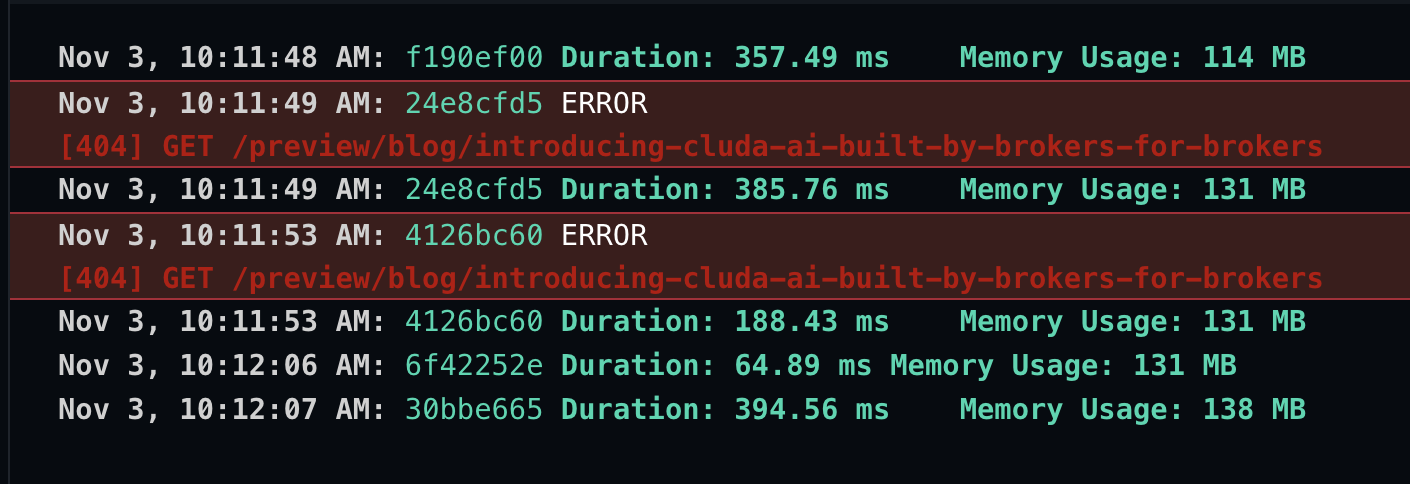
Netlify functions log:

Hope you can figure it out…
Thanks!

Thanks for the snippets + logs, super helpful.

I see two issues that explain the 404s:

  1. Your preview endpoint is at /api/preview, but the requests hit /preview/...

    (Netlify log: [404] GET /preview/blog/...). So the app has no route there.

  2. enableAutoPreviews isn’t receiving the event, and your preview handler isn’t either, so preview cookies can’t be read.

Please try these changes:

  1. Move the file to src/routes/preview/+server.ts (no /api).
// src/routes/preview/+server.ts
import { redirectToPreviewURL } from '@prismicio/svelte/kit';
import { createClient } from '$lib/prismicio';

export const prerender = false;

export const GET = async (event) => {
  const client = createClient(event);
  return redirectToPreviewURL({ client, event });
};
  1. Pass event everywhere previews are enabled:
// src/routes/+layout.server.ts
import { createClient } from '$lib/prismicio';
import { enableAutoPreviews } from '@prismicio/svelte/kit';

export const prerender = 'auto';

export async function load(event) {
  const client = createClient(event);
  enableAutoPreviews({ client, event });

  const navigation = await client.getSingle('main_nav');
  const footer = await client.getSingle('footer');

  return {
    navigation,
    footer,
    url: event.url.pathname
  };
}
  1. Keep export const prerender = false; in src/routes/blog/[uid]/+page.server.ts (you already have this).

  2. In your Prismic repo (Settings → Previews), set the preview route to /preview for both local and production.

If this still 404s, could you confirm:

  • The Preview config in Prismic shows /preview (not /api/preview)?

  • After redeploy/restart, do you see any new errors in Netlify function logs when hitting /preview?token=...?

Hi @Phil thanks again for sharing your thoughts!

I've tried your suggestion but it didn't work as well… now i am getting error 500.

As I revert it back, it's still working on single pages, local and online, but now on the /blog/:uid pages it's returning the websites 404 page instead that netlify one… we might be close to the solution…

OK, my bad on that one then haha We’ll get there.

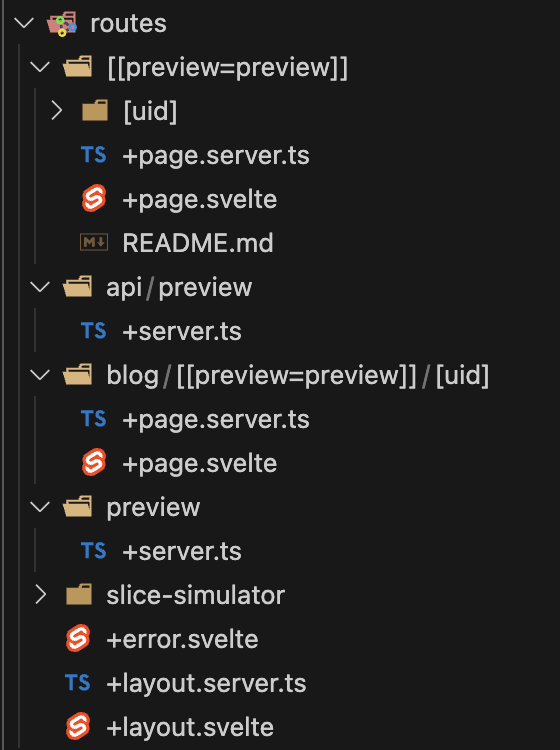
Can you show me what your routes directory looks like and if it resembles the directory in this sample project?

And also the routes in this file?

Also your This is the blog/[uid]/+page.server.ts should resemble this more than what you have, nextPage and previousPage don’t work and you need to use something like:

export const entries: EntryGenerator = async () => {
	const client = createClient();
	const pages = await client.getAllByType('page');
	return pages.map((page) => ({ uid: page.uid }));
};

You can find that full example here.

Hello @Phil !

Here it is:

prismicio.ts file:

import { createClient as baseCreateClient, type Route } from '@prismicio/client';
import { type CreateClientConfig, enableAutoPreviews } from '@prismicio/svelte/kit';
import sm from '../../slicemachine.config.json';

export const repositoryName = import.meta.env.VITE_PRISMIC_ENVIRONMENT || sm.repositoryName;

const routes: Route[] = [
    { type: 'page', path: '/', uid: 'home' },
    { type: 'page', path: '/:uid' },
    { type: 'blog_post', path: '/blog/:uid' }
];


export const createClient = ({ fetch, cookies, ...config }: CreateClientConfig = {}) => {
const client = baseCreateClient(repositoryName, {

routes,
fetch,
...config
    });


if (cookies) {
enableAutoPreviews({ client, cookies });
   }

return client;
};

OK that should be ok, I think you’ll need to update src/routes/[[preview=preview]]/[uid]/+page.server.ts to look like this:

import { asText } from '@prismicio/client';

import { createClient } from '$lib/prismicio';
import type { EntryGenerator, PageServerLoad } from './$types';

export const load: PageServerLoad = async ({ params, fetch, cookies }) => {
	const client = createClient({ fetch, cookies });
	const page = await client.getByUID('blog_post', params.uid);

	return {
		page,
		title: asText(page.data.title),
		meta_description: page.data.meta_description,
		meta_title: page.data.meta_title,
		meta_image: page.data.meta_image.url
	};
};

export const entries: EntryGenerator = async () => {
	const client = createClient();
	const pages = await client.getAllByType('blog_post');
	return pages.map((page) => ({ uid: page.uid }));
};

Hello @Phil

It didn't work either. Now it's getting 404 on every page…
I think thats happening because I am using the mapSliceZone from prismicio/client.

This is my actual [uid]/+page.server.ts

import { asText, mapSliceZone } from '@prismicio/client';
import { createClient } from '$lib/prismicio';
import { mappers } from '$lib/slices/mappers';

export async function load({ params, fetch, cookies }) {
  const client = createClient({ fetch, cookies });
  const page = await client.getByUID('page', params.uid);
  const slices = await mapSliceZone(page.data.slices, mappers, { client });

return {
  page,
  slices,
  title: asText(page.data.title),
  meta_description: page.data.meta_description,
  meta_title: page.data.meta_title,
  meta_image: page.data.meta_image.url
  };
}

export async function entries() {
  const client = createClient();
  const pages = await client.getAllByType('page');

  return pages.map((page) => {
    return { uid: page.uid };
  });
}

The mappers.ts

import contentListMapper from './ContentList/mapper';
export const mappers = {
content_list: contentListMapper
};

And the mapper.ts

import type { Client, Content, SliceMapper } from '@prismicio/client';
type Context = { client: Client<Content.AllDocumentTypes> };

type ContentListProps = {
  slice: Content.ContentListSlice;
  items: Content.BlogPostDocument<string>[] | Content.ProjectsDocument<string>[];
};

const mapper: SliceMapper<Content.ContentListSlice, ContentListProps, Context> = async ({ slice, context }) => {

const { client } = context;

const items = slice.primary.content_type === 'Blog Post'
? await client.getAllByType('blog_post')
: await client.getAllByType('projects');

return { slice, items };

};


export default mapper;

Can you send me the Github repo for your project so I can test on my end?

Thanks.

Hey @Phil , you can use this - GitHub - cluda-dev/website-mirror: website mirrored repo

Thanks again!

Thanks for sending this. The issue is the route structure for blog posts.

Current Structure (Incorrect)

  • Blog route location: src/routes/blog/[[preview=preview]]/[uid]/
  • This creates URLs:
    • /blog/:uid (prerendered)
    • /blog/preview/:uid (server-rendered)

Expected Structure (Correct)

  • Should be: src/routes/[[preview=preview]]/blog/[uid]/
  • This would create:
    • /blog/:uid (prerendered)
    • /preview/blog/:uid (server-rendered for previews)

Why This Breaks Previews

  1. Route resolver configuration (src/lib/prismicio.ts) defines:

    { type: 'blog_post', path: '/blog/:uid' }
    
  2. When redirectToPreviewURL runs (in src/routes/api/preview/+server.ts and src/routes/preview/+server.ts), it:

    • Resolves the document URL using the route resolver → /blog/:uid
    • Prepends /preview/preview/blog/:uid
  3. The current route structure doesn't match this URL pattern, so preview redirects fail.

Comparison with Working Routes

The main page route works because it's structured correctly:

  • src/routes/[[preview=preview]]/[uid]/ creates /preview/:uid for previews
  • This matches what Prismic expects for the /page type routes

Solution

Move the blog route files from:

  • src/routes/blog/[[preview=preview]]/[uid]/

To:

  • src/routes/[[preview=preview]]/blog/[uid]/

This aligns the route structure with Prismic's preview URL generation and ensures preview redirects work correctly. I’ve tested on my end to be sure.

Thank you very much @Phil !
Now it's working fine.